New Release • Momentum + Imbalance + Order Blocks
Elev8+ Momentum Gaps + Order Blocks: Spot Displacement Zones, FVGs, OBs, and Cleaner Reversal Locations
Most traders don’t struggle to find signals—they struggle with location. Elev8+ Momentum Gaps helps you map where price moved with real momentum and left imbalances behind (FVGs + impulse zones), and now includes a dedicated Order Block Tool to mark key structural supply/demand zones. Use it as your context layer, then use Elev8+ Reversal triangles as your execution trigger when price revisits these zones.
Educational content only. Not financial advice. No performance guarantees.
Core idea
Strong moves leave footprints. Momentum Gaps highlights displacement, imbalance zones, and order blocks so you can trade from locations where reactions are more likely.
What you get
Impulse Zones (volume + ATR displacement), a FVG Pro engine with quality filters + optional IFVG state tracking, and a new Order Block Tool (ICT + swing-extreme engines).
Best combo
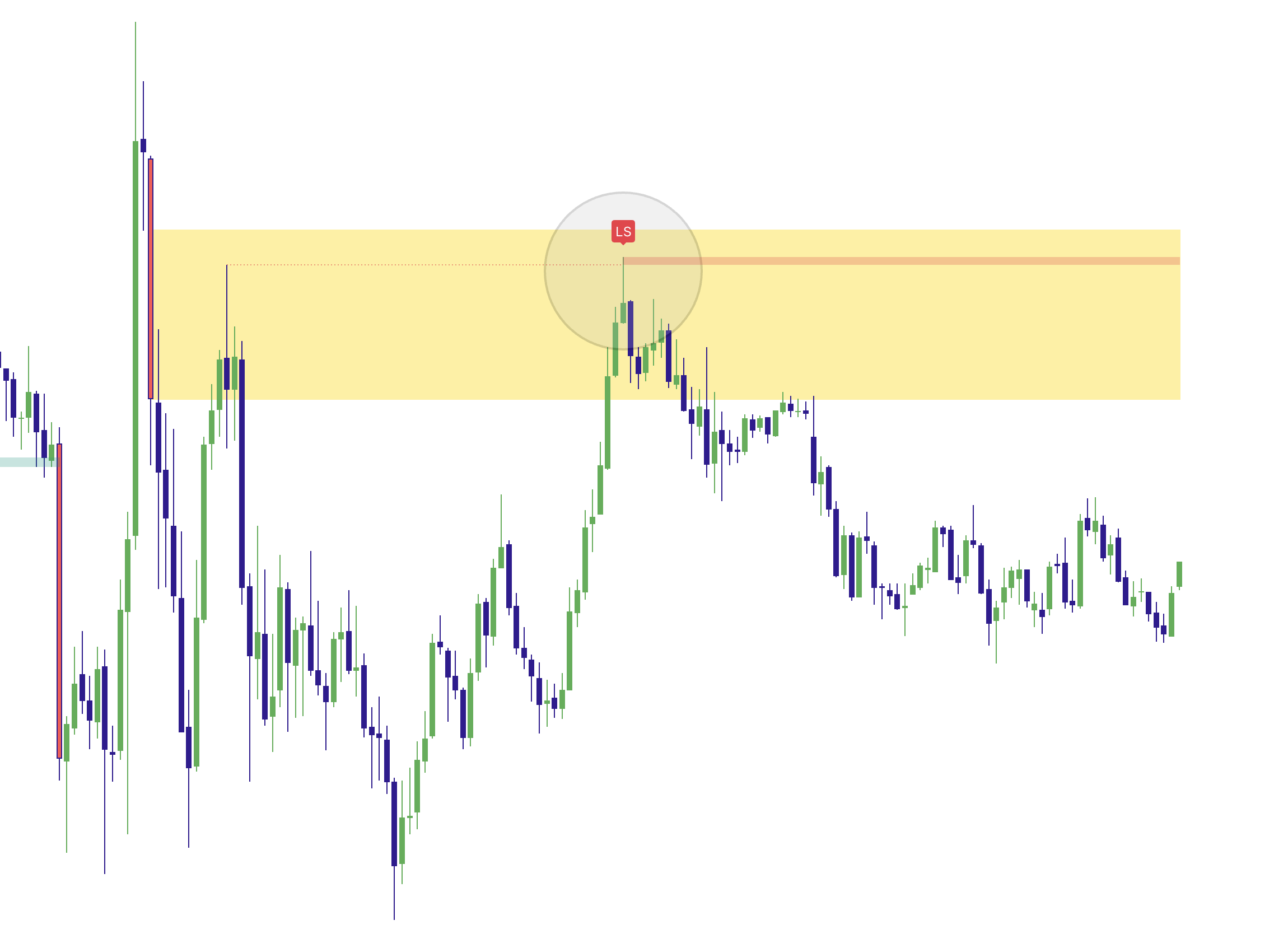
Use Momentum Gaps as context, then take Elev8+ Reversal triangles or LS signals as the trigger when price re-enters a clean zone.
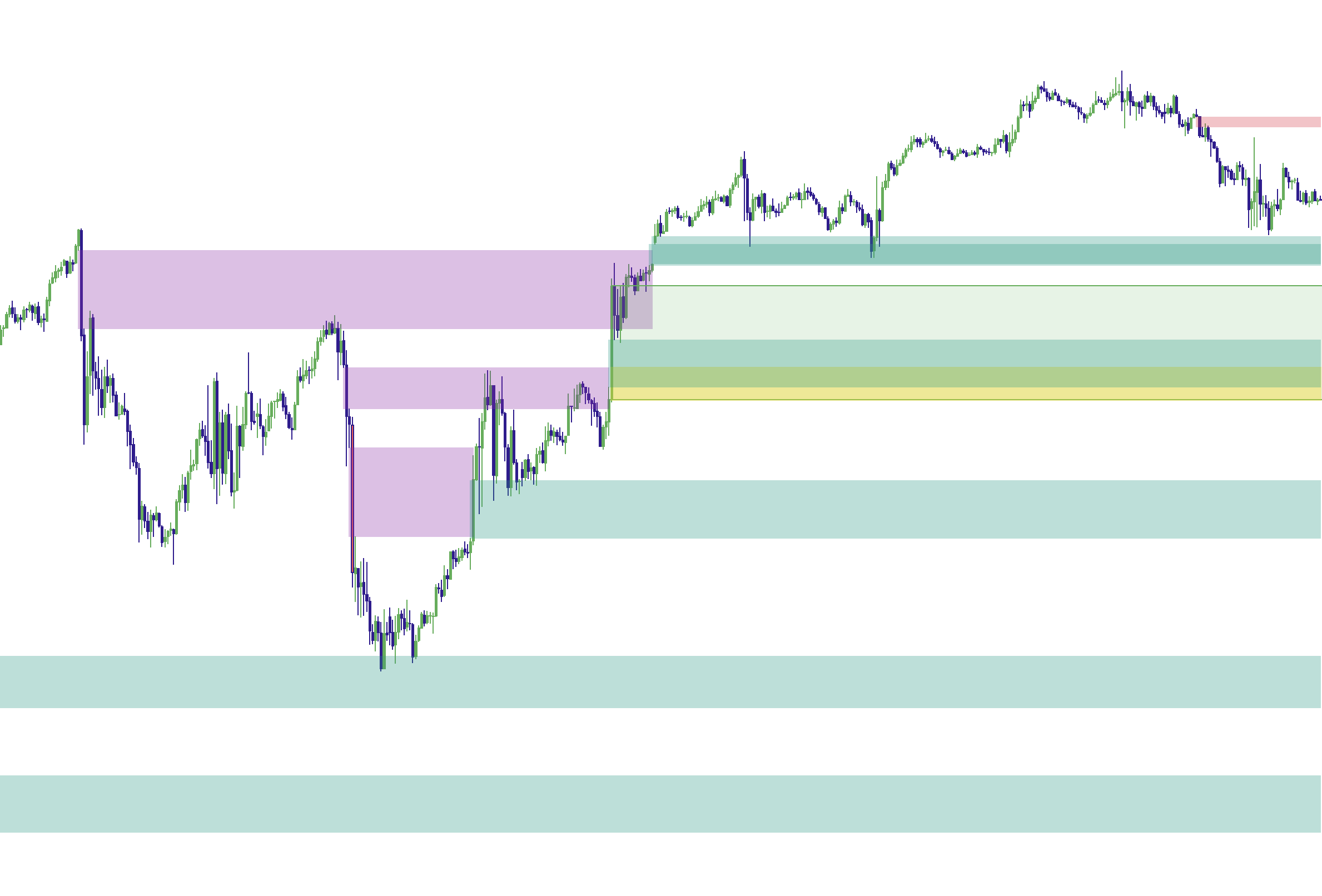
Example 1: Impulse zone prints after strong displacement
What Momentum Gaps Is Actually Measuring
Momentum Gaps blends practical location tools into one script: Impulse Zones (displacement candles), Fair Value Gaps (FVGs) (imbalances), and now a dedicated Order Block Tool (structural supply/demand zones). Together, they answer a simple question:
The goal
Identify zones where the market likely moved too efficiently (imbalanced), so later price revisits have a higher chance of reaction, rebalance, or rotation.
1) Impulse Zones (Displacement Footprints)
An Impulse is detected when a candle meets two conditions:
- Volume Strength: current volume exceeds a volume average by a user-defined multiplier.
- Move Size: the candle body is larger than ATR by a user-defined multiplier.
What the impulse zone represents
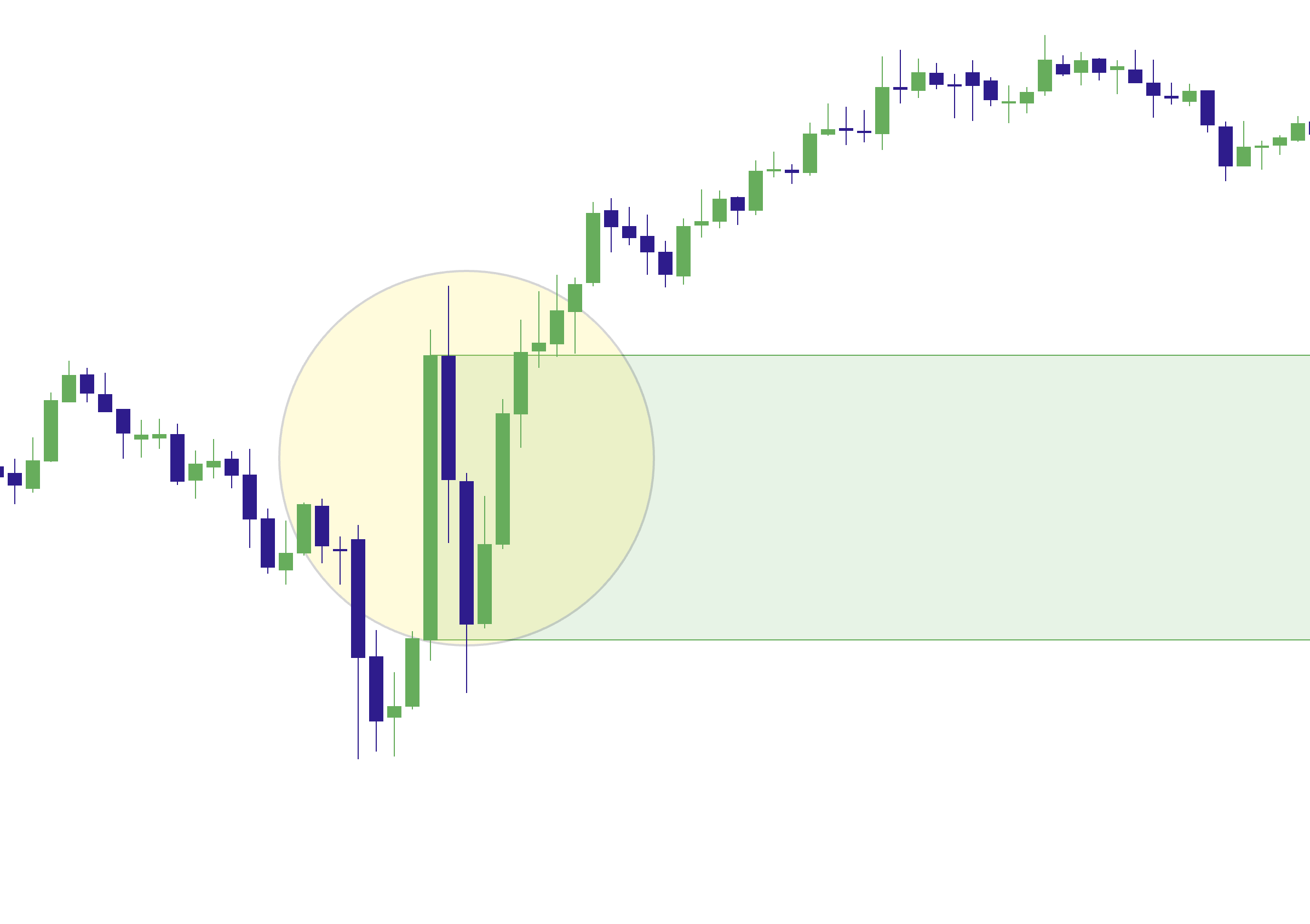
The script can draw a filled zone between the candle’s open and close. This is the “displacement area” — the portion of the move that often gets revisited later.
Delete When Closed Through (default ON)
If price later closes fully through the impulse zone, the script can remove it automatically. This helps keep your chart clean and focused on zones that still matter.
Example 2: Price revisits an impulse zone (re-entry context)
2) FVG Pro (Fair Value Gaps + Quality Filters)
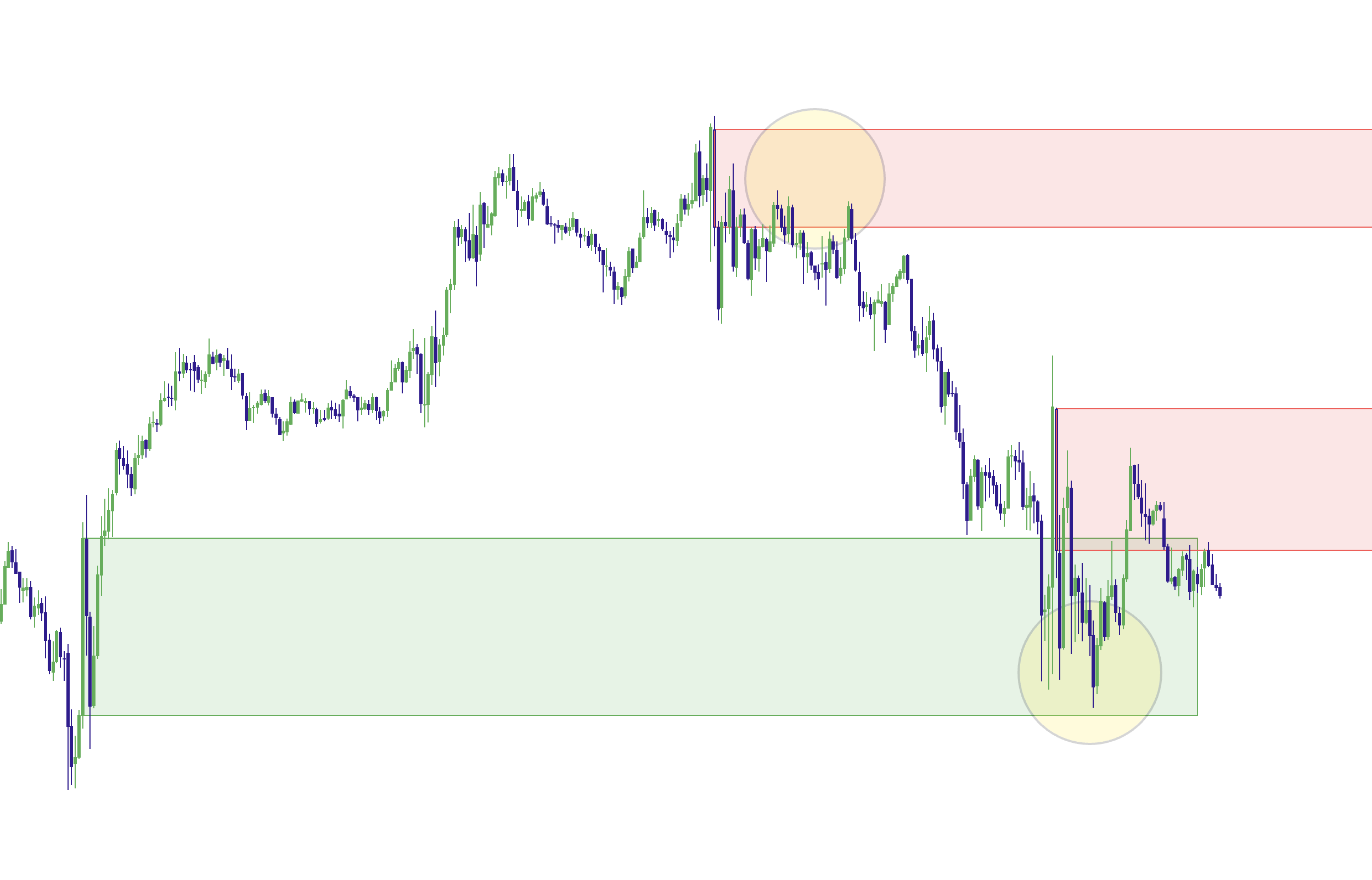
The FVG engine detects classic 3-candle gaps (imbalances) and lets you control how selective the script is. This is where Momentum Gaps becomes “Pro-grade” instead of a basic gap marker.
Filtering modes (how selective you want it)
- All FVG: shows all detected gaps (baseline).
- Only FVG in Trend: emphasizes gaps aligned with the higher timeframe trend filter.
- Strict: adds candle body-strength requirements (reduces low-quality gaps).
- Super-Strict: can additionally require volume confirmation for higher selectivity.
Trend filter (optional)
When enabled, the script checks a higher timeframe EMA-based trend context. This helps reduce counter-trend gap emphasis, particularly on fast charts where noise is high.
Session filter and displacement filter (optional)
- Session Filter: only detect new FVGs during a session window you define.
- Displacement Filter: only detect gaps created by candles that meet a minimum body-size and body-strength threshold.
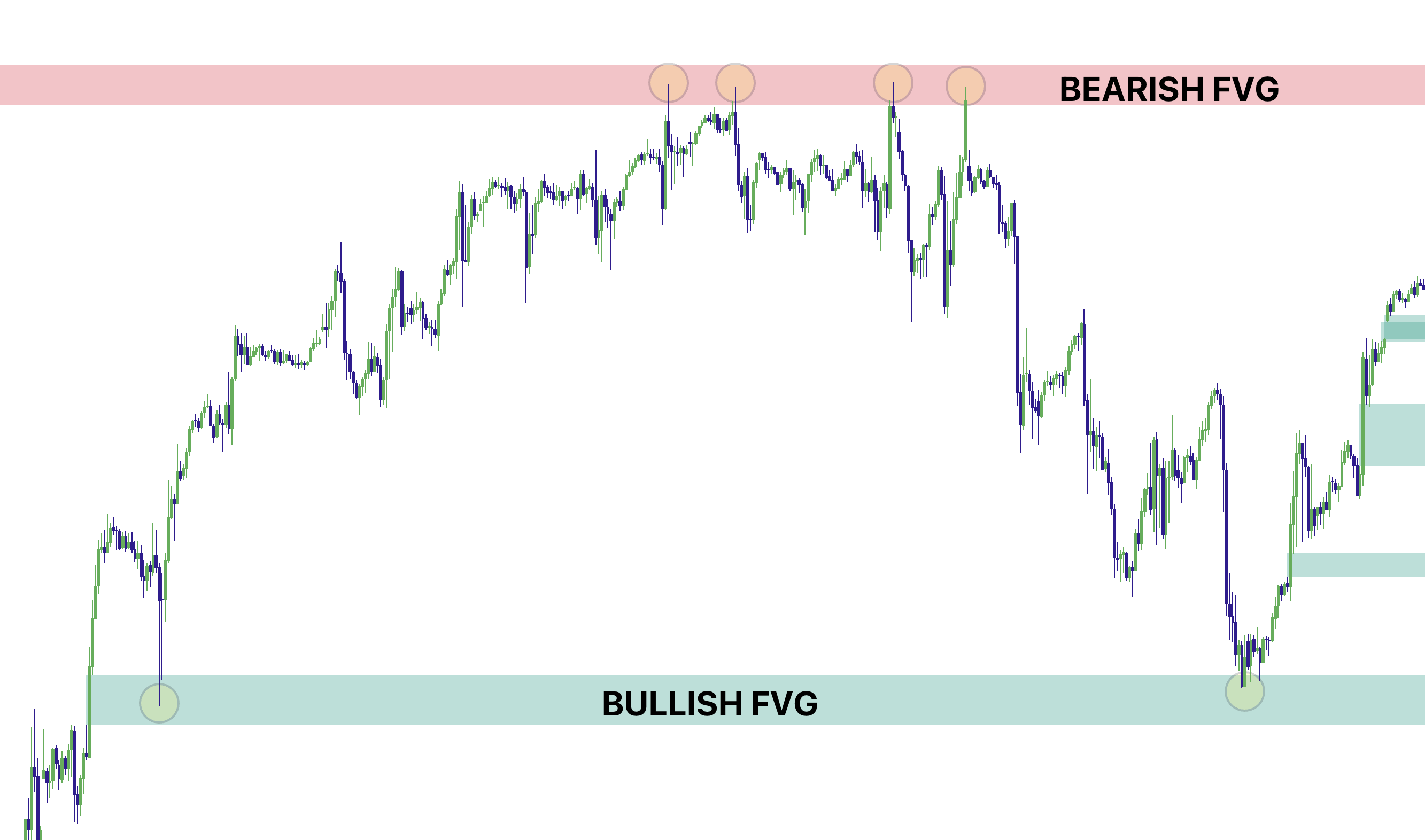
Example 3: Clean bullish + bearish FVGs on the chart
3) Order Blocks Tool (ICT Style + Swing-Extreme Zones)
The Order Block Tool adds a structural “supply/demand” layer on top of Momentum Gaps. It is designed to run cleanly alongside impulses and FVGs so you can stack context without clutter.
How to use Order Blocks (the right way)
Order Blocks are not “auto entries.” Treat them as location. The highest-quality setups happen when price revisits an order block and you see rejection + your Elev8+ Reversal trigger.
Two independent OB engines (run either one, or both)
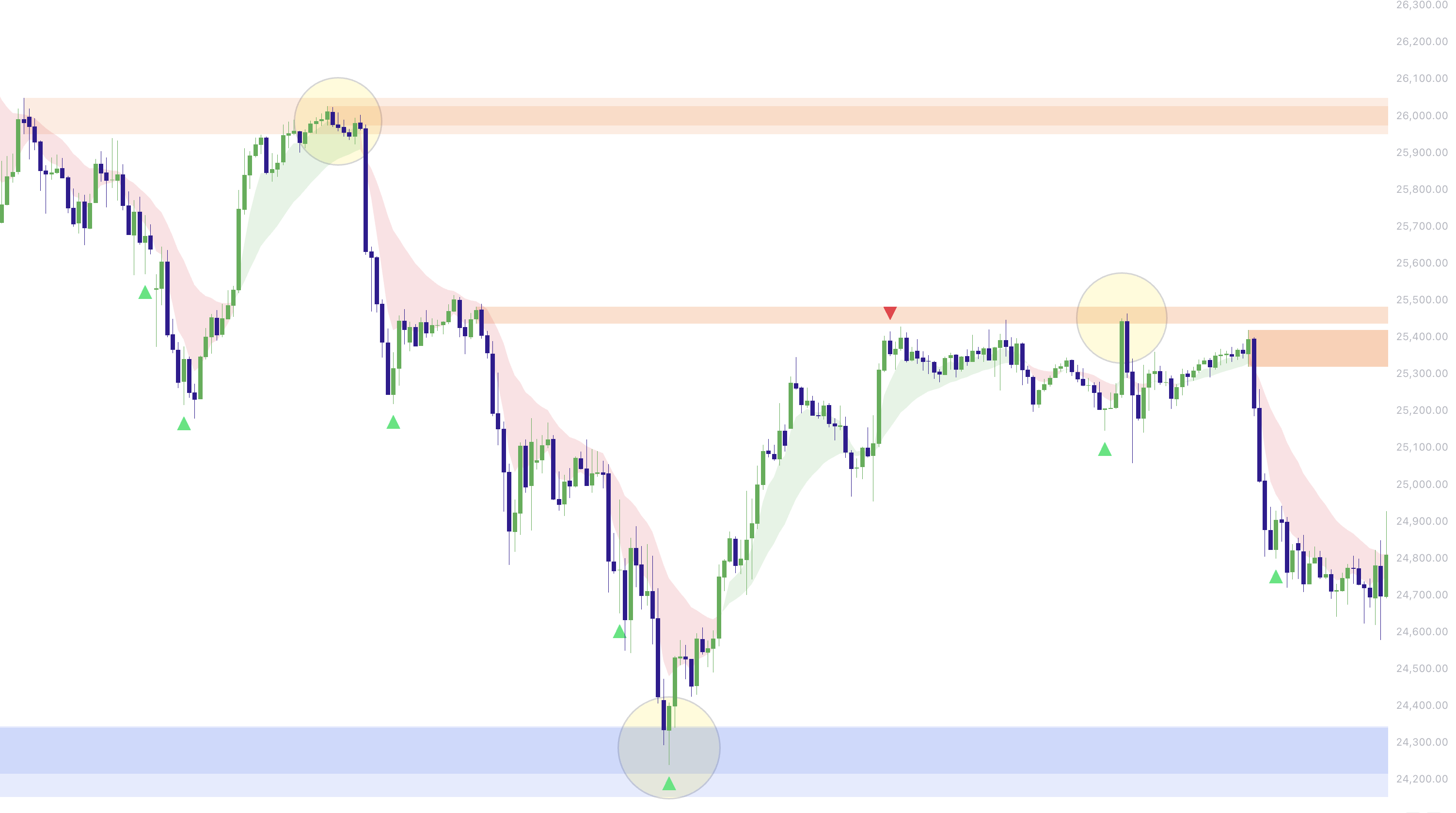
- ICT Style Order Blocks: marks the last opposite-color candle before the break (bullish OB = last bearish candle before the up-break; bearish OB = last bullish candle before the down-break). This is the “classic” approach for clean OB definitions.
- Swing-Extreme Order Blocks: marks the extreme candle in the swing segment before the break (bullish OB = lowest extreme; bearish OB = highest extreme). This often finds more “structural” zones even if candle color is not perfect.
Clean invalidation (close-through only)
By default, order blocks are only removed when price closes beyond the zone. Wicks alone won’t invalidate the block, so you keep more valid reaction zones on your chart.
Optional displacement filter (for higher quality OBs)
If you want fewer, higher-quality OBs, enable the optional Displacement Filter. This requires the break candle to have a minimum body size vs ATR, filtering out weak, noisy breaks.
Example 4: ICT Style + Swing-Extreme order blocks plotted together
4) IFVG (Inverse FVG): When the Gap Fails
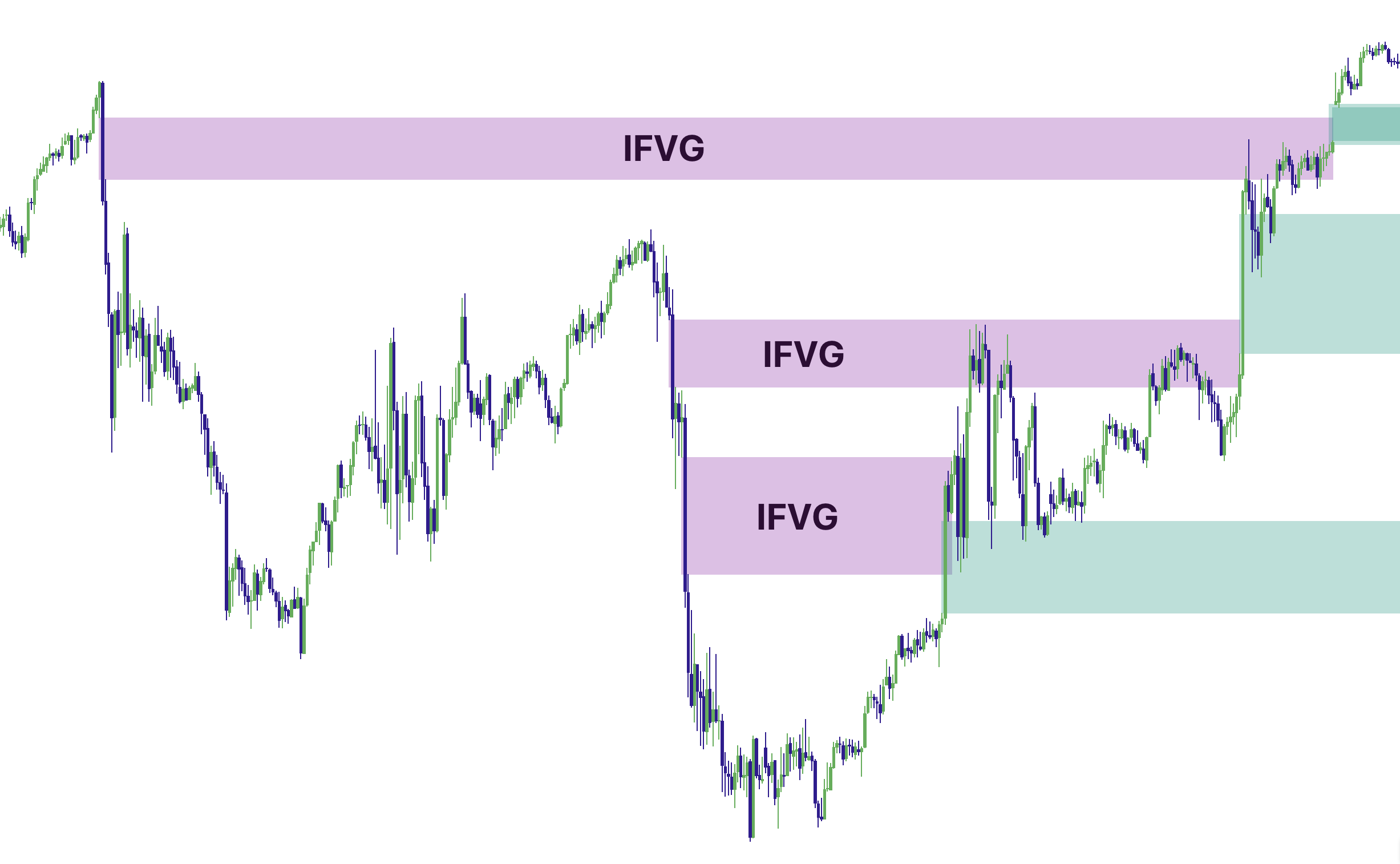
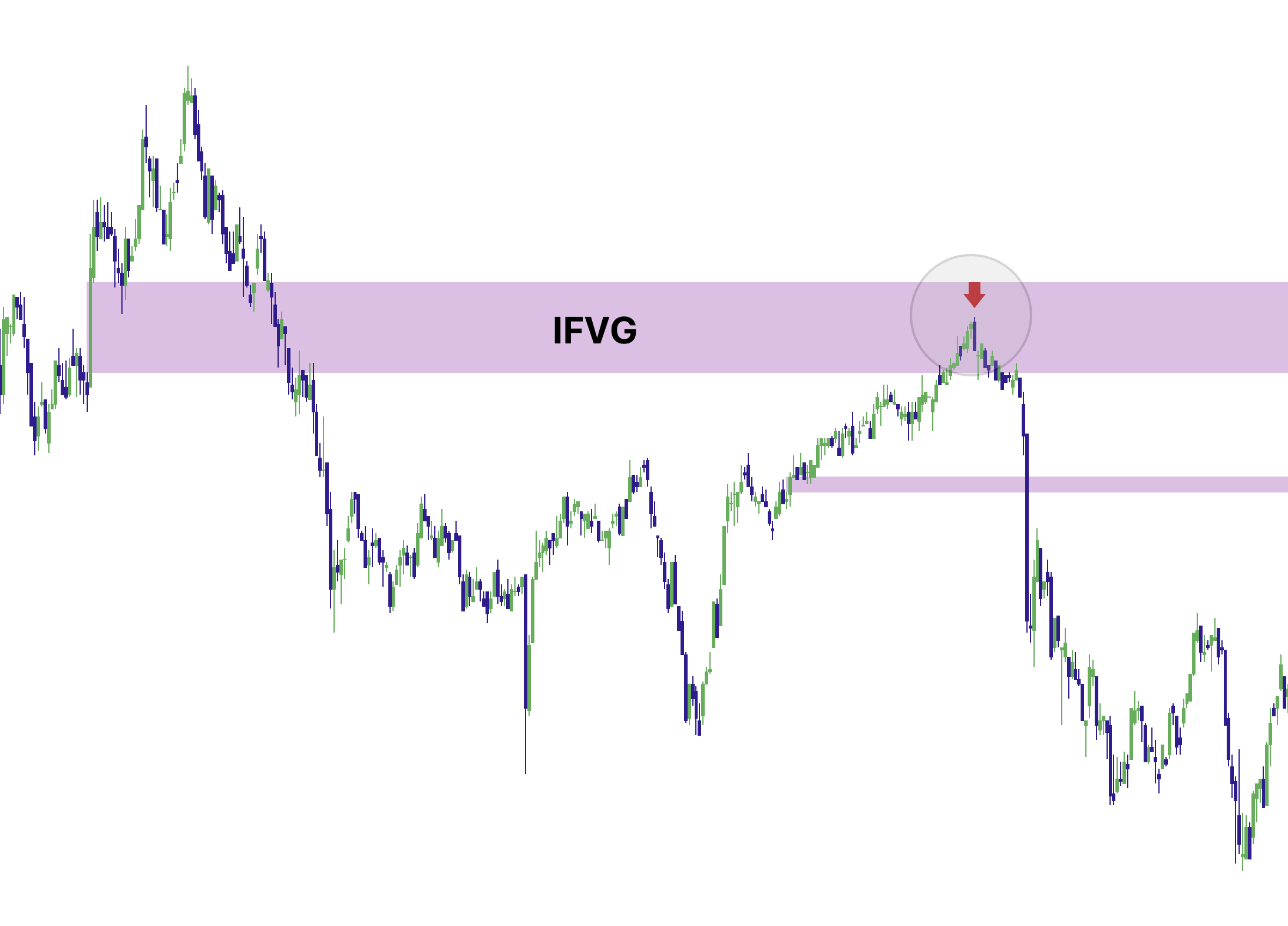
When price closes fully through an active FVG, Momentum Gaps can flip that zone into an Inverse FVG (IFVG) (default purple). This provides a clean “state change” so you can see where an imbalance was invalidated and potentially becomes a different type of reaction area.
Cleaner visibility controls (so charts stay readable)
IFVGs can be managed in a clean, user-friendly way:
- Show inverse FVGs (IFVG)? When OFF, IFVG zones are removed (not shown).
- Extend IFVG forward? When OFF (default), IFVGs remain where they occurred but do not keep extending right.
Example 5: FVG flips into IFVG (purple) after a close-through
5) Confluence Zones: Impulse + FVG Overlap
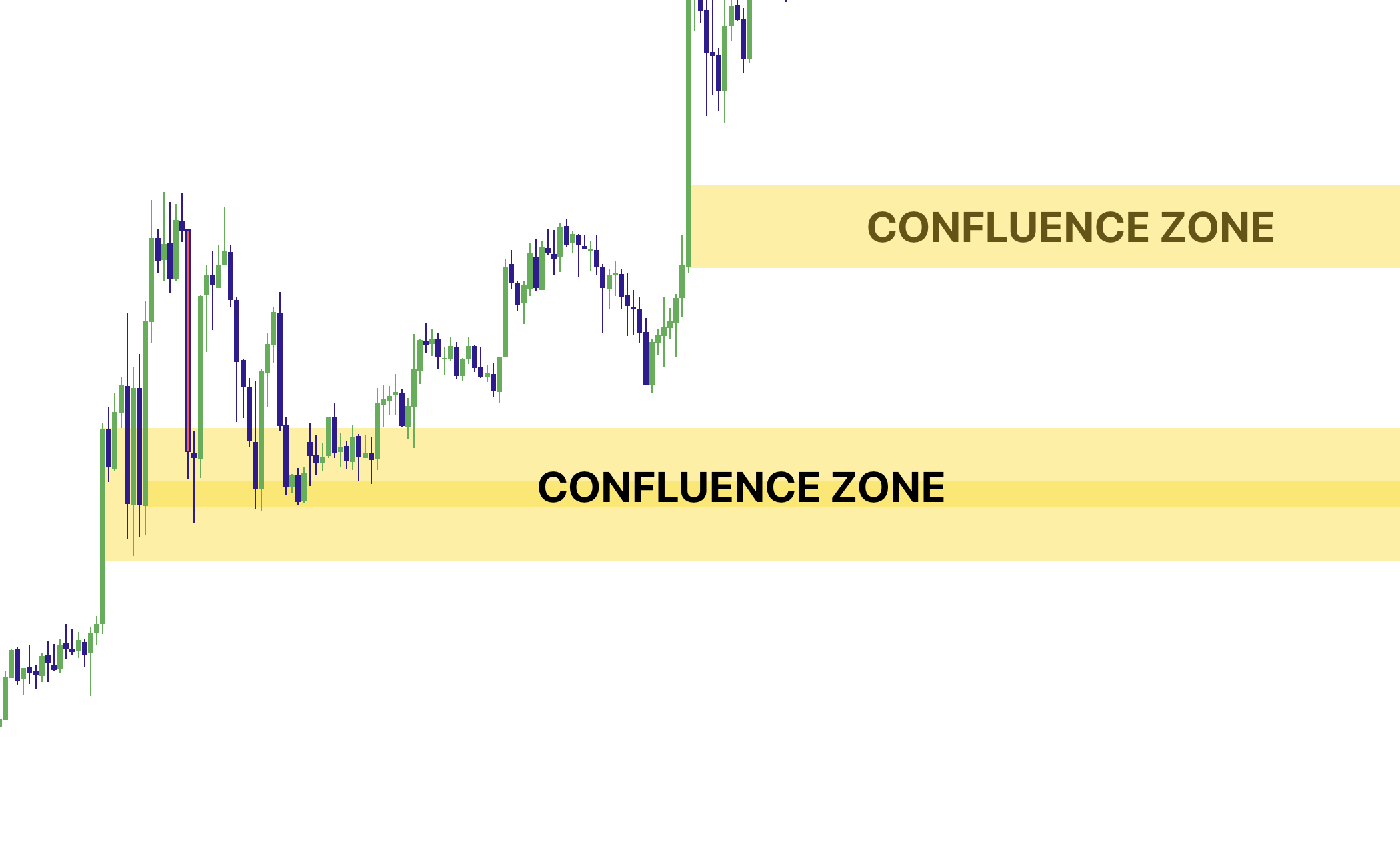
Confluence zones highlight where a new impulse displacement overlaps an existing active FVG. This is a strong “why here?” stack: momentum footprint + imbalance in the same region.
Why confluence matters
Most high-quality reactions happen at stacked context. A confluence zone means price moved hard and left an imbalance behind. That’s a better “location” than a random level in the middle of the range.
Example 6: Confluence zone prints (fill only, border hidden by default)
The Right Way to Trade It: Context First, Trigger Second
Momentum Gaps is not a “buy/sell button.” It’s a location engine. Your best results usually come from combining it with an execution tool—like Elev8+ Reversal triangles.
The rule
Momentum Gaps + OBs = location + context. Elev8+ Reversal = trigger. Prioritize reversal triangles or LS signals when they print inside an impulse zone, FVG, IFVG, confluence zone, or order block.
Two High-Probability Playbooks (with Elev8+ Reversal)
1) “Retest → Rejection → Trigger” (the core playbook)
- Step 1: A clean impulse/FVG/OB/confluence zone prints.
- Step 2: Price rotates away (confirms it mattered).
- Step 3: Price re-enters the zone (this is the opportunity).
- Step 4: Wait for rejection + an Elev8+ Reversal triangle.
- Step 5: Define invalidation outside the zone, not “in the middle.”
Example 7: LS signal triggers inside stacked context
2) “IFVG flip → retest” (failed gap rotation)
- Step 1: An FVG forms and is respected briefly.
- Step 2: Price closes fully through it → it becomes an IFVG (purple).
- Step 3: Price later revisits the IFVG area.
- Step 4: Use rejection + an Elev8+ Reversal triangle for execution.
Example 8: IFVG flip + later retest with a reversal trigger
Alerts (What You Can Automate or Monitor)
Momentum Gaps includes alert conditions so you can monitor structure without staring at the chart all day. Useful alerts include:
- Impulse Created (new displacement candle)
- Impulse Zone Re-Enter (price re-enters an impulse zone)
- FVG Created (new bullish or bearish FVG)
- FVG Re-Enter (price re-enters an active FVG)
- IFVG Created (FVG closed through and flipped)
- Confluence Created (impulse + FVG overlap prints)
- Confluence Re-Enter (price re-enters a confluence zone)
- Bullish OB Created (new bullish order block)
- Bearish OB Created (new bearish order block)
Momentum Gaps Checklist (before you take a reversal)
• The zone is clear (impulse/FVG/IFVG/confluence/OB), not “random space.”
• Price is re-entering the zone (you are not chasing the impulse candle).
• You see rejection (stall, wicks, failed continuation) at the zone boundary.
• Elev8+ Reversal triangle prints inside/at the edge of the zone.
• Invalidation is defined outside the zone (tight and logical).
• You’re not fading obvious acceptance/continuation behavior.
Example: Price Sweeps London Low giving us an entry signal with Elev8+ "LS" Signal. Price moves up and creates a Golden Confluence zone that when price holds and rejects gives us confidence to hold the trade, or even trigger a 2nd entry and put Stop Loss to break even.

If you cannot define invalidation, you do not have a clean zone trade—only a guess.
Common Mistakes (and the Fix)
- Mistake: Treating zones as auto-entries. Fix: zones are “where,” triangles are “when.”
- Mistake: Chasing the impulse candle. Fix: wait for re-entry and rejection.
- Mistake: Too many zones on chart. Fix: lower Max zones, use trend/strict modes, and keep IFVG extension OFF.
- Mistake: No invalidation plan. Fix: define risk outside the zone boundary.
Want to see Momentum Gaps in action?
Use Momentum Gaps to mark the highest-quality displacement, imbalance, and order block zones, then use Elev8+ Reversal triangles as your execution trigger. This combination helps you trade from better locations with defined risk.
Indicators and examples are for education only. Always define risk and trade only what fits your plan.